Dashboard
The dashboard is your landing page — a health-and-control panel. It answers “is my system healthy?” at a glance, surfaces recent generation runs, and holds the managed-channel tables and EPG output preview.
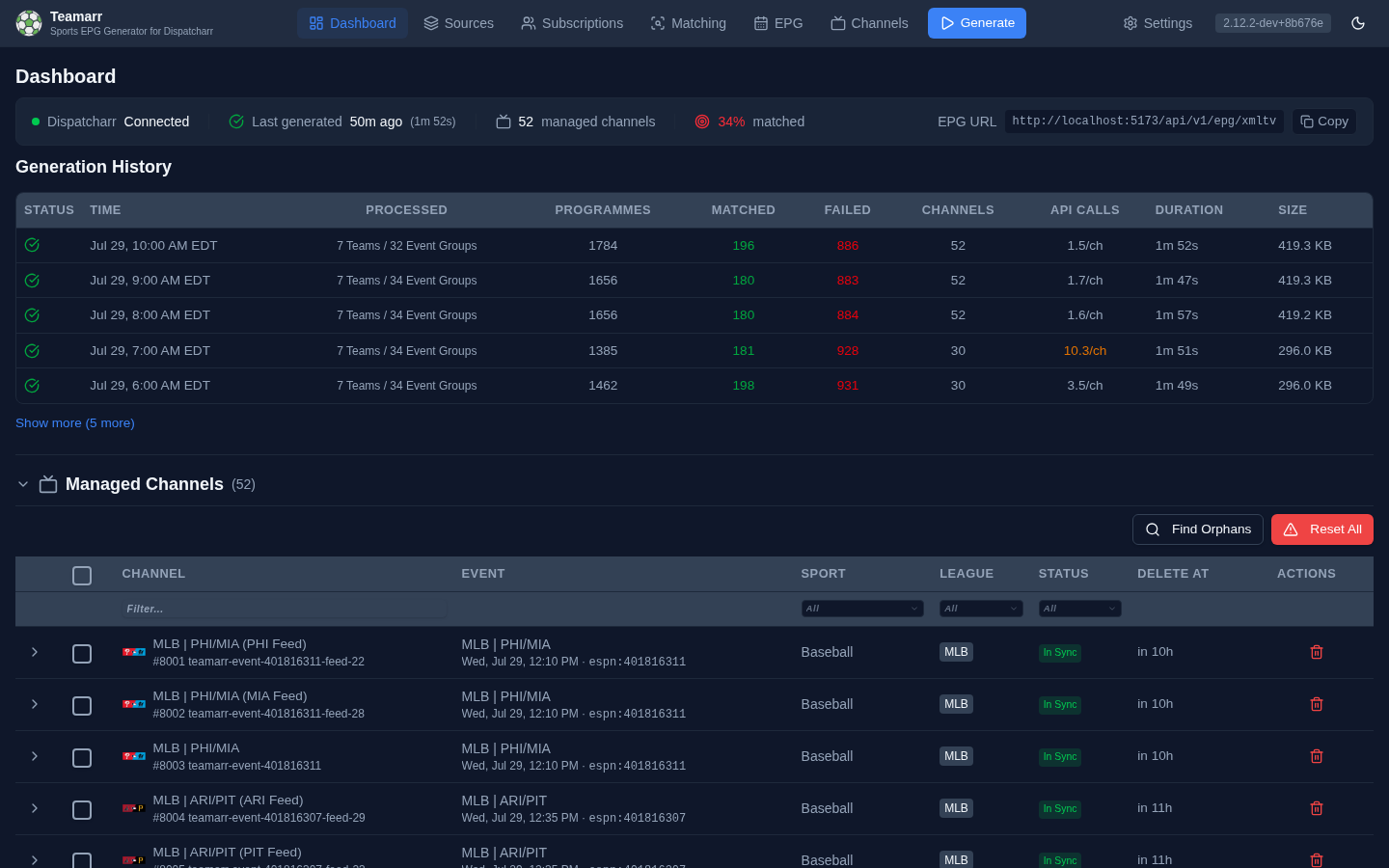
Status Strip
A read-only strip across the top shows system health at a glance:
| Item | Shows |
|---|---|
| Dispatcharr | Connection state — Connected (green), Disconnected (amber), Error (red, hover for the message), or Not configured |
| Last generated | When the last run finished (relative time) and its duration, color-coded by staleness: green under a day, amber 1–3 days, red over 3 days or failed. Shows Generating… with a spinner during an active run, and a muted “Never generated” before the first run |
| Managed channels | Active Teamarr channel count recorded by the last generation run |
| Matched | Overall stream match rate, color-coded (only shown when match data exists) |
| Media servers | Appears only when a configured Emby, Jellyfin, Channels DVR, or Plex server has failed its post-generation refresh on three or more consecutive runs. Hover for the server, failure count, and last error. A single miss stays quiet — this catches a server that has quietly stopped refreshing (a moved host, an expired key) |
| EPG URL | The XMLTV URL with a one-click Copy button — this is where you grab the URL for Dispatcharr |
During a generation run, the channel and match-rate values show a spinner until fresh numbers land.
Getting Started
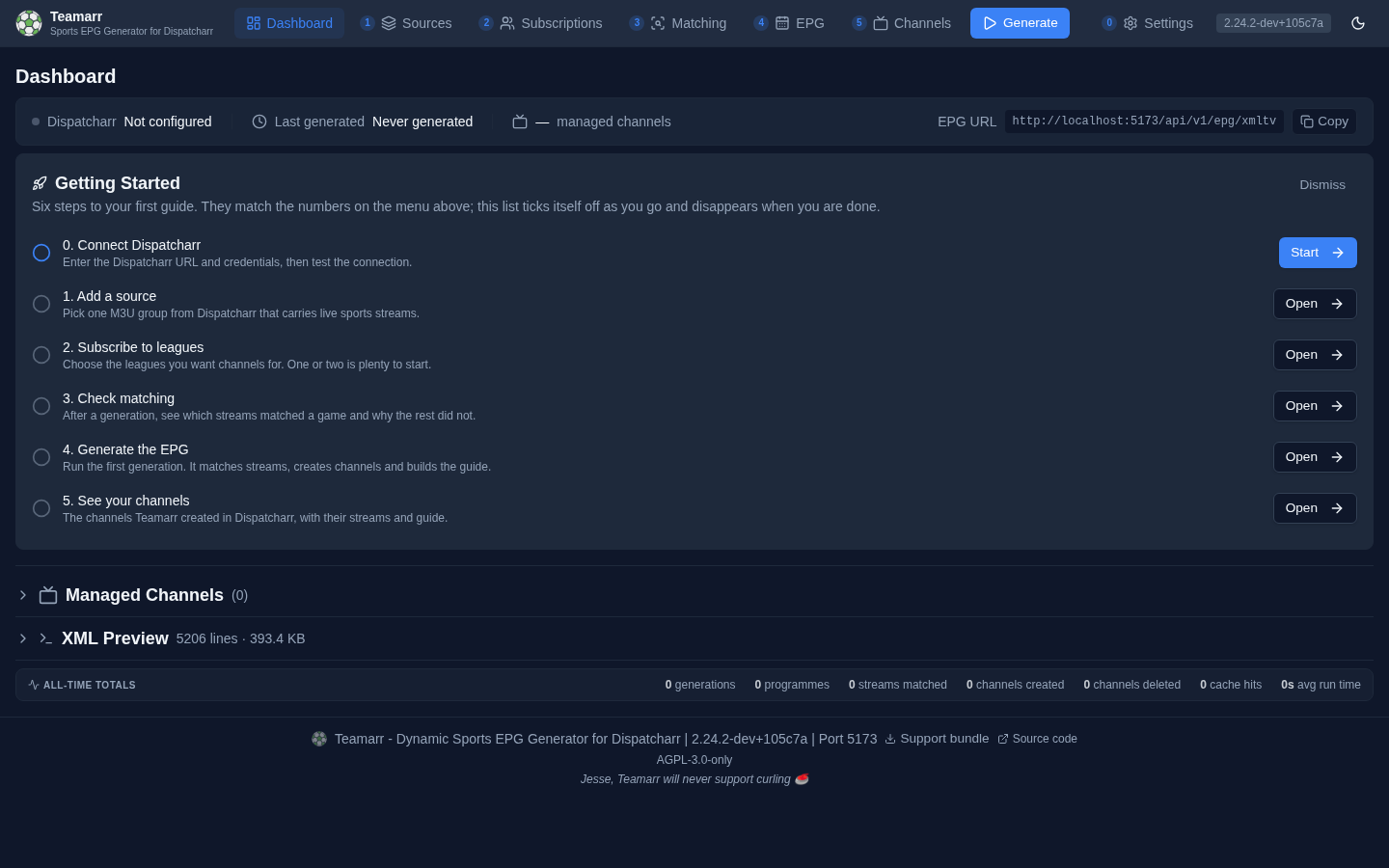
On a new install, a Getting Started card sits under the status strip with six steps, numbered to match the menu: connect Dispatcharr, add a source, subscribe to leagues, check matching, generate the EPG, see your channels. Each step reads its state from the install itself and ticks off as you go; the next step to do carries a Start button that opens the right page. Dispatcharr is assumed — the first step is connecting it.
The card disappears on its own once a generation has completed and created at least one channel. Dismiss closes it early for this install (it is a setting, not a browser preference). To bring it back, call POST /api/v1/setup/getting-started/restore; it still hides once setup is complete.
Generation History
A table of recent full-pipeline runs (matching, channels, and EPG). Five show by default; Show more expands to the ten most recent.
| Column | Description |
|---|---|
| Status | Completed, partial, failed, cancelled, or running (spinner) |
| Time | When the run started |
| Processed | What was processed in the run |
| Programmes | Total programmes generated. Hover for the Events / Pregame / Postgame / Idle breakdown |
| Matched | Streams matched to events. Click to open a searchable drill-down of matched streams, filterable by group, with a badge showing how each match was made (Cache, Alias, Fuzzy, Direct, …) and a Fix button to correct a wrong match |
| Failed | Streams that could not be matched. Click to see each stream’s failure reason, and use Fix to manually match it via the Event Matcher |
| Channels | Active channels after the run |
| API Calls | Sports-provider HTTP calls made during the run. The count itself is not a health signal — it varies with cache state and the leagues you follow. Amber means a provider rate-limited some calls (retried, usually recovered); red means calls failed outright. Hover for the per-endpoint breakdown and the failure and rate-limit detail |
| Duration | How long the run took |
| Size | Size of the generated XMLTV file |
Managed Channels
A collapsible Managed Channels table lists the channels Teamarr currently maintains in Dispatcharr. It includes time-limited event channels and persistent managed Team EPG channels. Team rows are identified as persistent team channels and show their ownership sync status; they are included for audit and visibility only. The Event column for an event channel shows a compact matchup (league, then away/home abbreviations — e.g. MLB | LAA/MIN; card and racing events show the event name) plus the start time and the provider’s native event id (espn:401816119).
- Sync status badges — In Sync, Pending, Created, Drifted, Orphaned, or Error. Drifted event channels are corrected on the next generation run. Team-channel status reflects only a locally recorded ownership mapping.
- Expand an event row to see its attached streams with per-stream match detail, priority, and stream health (resolution, fps, bitrate). Team channels remain visible as an ownership audit, while their memberships are managed from the Team EPG workflow.
- Find Orphans detects Teamarr-tagged event channels in Dispatcharr that aren’t tracked locally; Reset All, the multi-select bar, and a per-row delete button handle event-channel removals. These controls, pending deletion scheduling, expiry, reconciliation, and orphan handling exclude persistent managed Team EPG channels. Manage those channels from EPG → Team EPG.
A separate Recently Deleted section lists channels removed by event cleanup (channel, event, sport, league, and when they were deleted).
EPG Output (XML Preview)
A collapsible XML Preview section contains:
- EPG analysis — coverage gaps and unreplaced-variable warnings, or an all-clear if the output is clean
- A searchable preview of the generated XMLTV file
All-Time Totals
A compact footer shows lifetime totals: generations, programmes, streams matched, channels created, channels deleted, cache hits, and average run time.
These totals are genuinely all-time: before old run records are pruned from the run history (or cleared via Clear Run History on Settings → Advanced), their sums are folded into a lifetime accumulator, so the totals keep growing across the retention window. Only full EPG generations count. Average run time reflects the retained run window only. The accumulator shipped in v2.9.0 and starts from the run history present at upgrade.