Media Servers
Connect media servers so their live TV guides refresh automatically after each EPG generation. Configure under Settings → Media Servers.
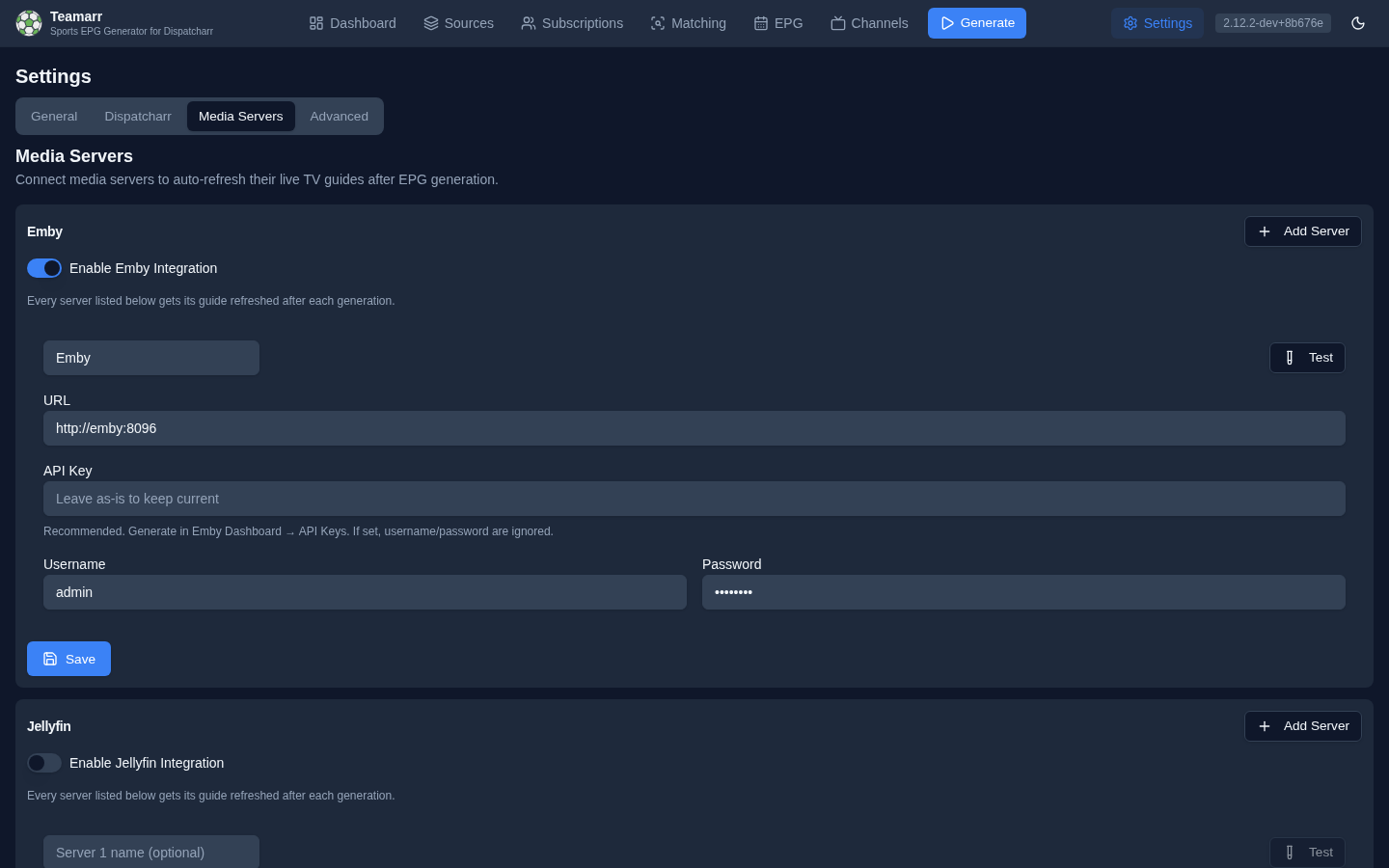
All four integrations support any number of servers, and every configured server across all four refreshes in parallel after generation — one slow or offline server never delays the others.
Each integration has its own Enable toggle — a configured-but-disabled integration is silently skipped, so if a server never refreshes, check the toggle first. Every server row has a Test button that reports the connected server and version. Rows added without a URL are dropped on save.
Emby / Jellyfin
Each server entry takes a URL and either an API key (recommended — generate in the server dashboard) or username/password. Click Add Server for additional servers; an optional name keeps logs readable. After each generation Teamarr triggers a guide refresh on every entry so new programmes appear without waiting for the server’s own scheduled refresh.
The refresh triggers the server’s own Refresh Guide scheduled task and waits for it to complete (with live progress, up to 5 minutes) — that’s why a generation run can sit near the end while a slow server churns.
Jellyfin 10.x and 12+ are both supported: Teamarr authenticates to Jellyfin with the standard Authorization: MediaBrowser … header rather than the legacy X-Emby-Token header that Jellyfin 12 removed.
Saved secrets display as ******** — leave them as-is to keep the stored value, or type over them to replace.
A failed refresh never fails the generation — but it is recorded. Each run stores every server’s outcome (success, duration, error) with its run stats, and once a server has failed three consecutive runs the Dashboard status strip shows a Media servers … not refreshing warning (hover for the error) and the support bundle raises a media_server_refresh_failing signal. If you see it, check the URL first: a server that moved hosts fails instantly on every run and is otherwise invisible.
Channels DVR
Channels DVR splits channel-list and guide data into two providers, so Teamarr refreshes both — sequenced, each step confirmed against the server’s log before the next:
- M3U Source — the custom channels source that pulls from Dispatcharr (
POST /providers/m3u/sources/<name>/refresh); Teamarr waits for the server to confirm the lineup refreshed - XMLTV Lineup — the guide data source for those channels (
PUT /dvr/lineups/<id>); Teamarr waits for the guide fetch and airing re-index to complete. Without this the channels update but the guide stays stale. If you don’t pick a lineup, Teamarr derivesXMLTV-<source name>automatically.
Both dropdowns are discovered live from the server once a URL is set (a saved selection that no longer exists on the server is flagged “not found on server”). The local Channels DVR API is unauthenticated by design — no credentials needed.
Multiple servers
Useful when several households or locations share one Dispatcharr: click Add Server and give each entry its URL, M3U source, and lineup. Every listed server receives the same channel set and EPG. The east/west or per-household split (which channels each DVR actually shows) lives in Dispatcharr profiles, not in Teamarr.
Times shown inside programme titles/descriptions come from your templates and render in Teamarr’s EPG timezone. Guide grid times always render in each client’s local timezone automatically — XMLTV timestamps carry offsets. If your servers span timezones, avoid time-of-day template variables rather than looking for per-server EPGs.
Plex
Plex’s Live TV & DVR feature (pointed at Dispatcharr’s HDHomeRun emulation) doesn’t notice new or removed channels on its own — after each generation Teamarr updates the channel map (PUT /media/grabbers/devices/<key>/channelmap), which enables channels on the matched device and binds each to its EPG data. That single call is also what makes Plex refresh its guide: it’s the same request Plex’s own UI sends when you open a tuner’s Channel Matching screen and press Save.
The call replaces the device’s entire state — both which channels are enabled and every channel’s guide binding. A channel left out of the write is disabled even if it is still listed as enabled, so Teamarr always sends the complete set.
Channels Teamarr doesn’t manage are never disabled, whatever their number. Teamarr sends the union of everything the device already has enabled and its own current channels, and it records what it pushed so it can later remove its own expired channels. A channel Teamarr has never pushed is not something Teamarr will ever turn off. Teamarr also refuses to write at all if the device read looks wrong — a channel missing its identifier, or an empty channel list on a device it has populated before — rather than turning a bad read into a destructive write, and it re-reads the device afterwards to confirm the write actually applied.
Setup
Each server entry needs a URL, a Plex Token (finding your token), and a DVR / Device selection. Once the URL and token are set, Teamarr discovers every DVR and its HDHomeRun devices from the server and lists them in the dropdown — pick the one whose URI matches the Dispatcharr HDHomeRun instance/profile this server should track. A device whose URI has no profile suffix (e.g. plain /hdhr) pulls channels from every Dispatcharr profile on that instance; only pick it if that’s actually what you want, since the channel-map merge then has to distinguish Teamarr’s channels from everyone else’s on a much larger shared set.
Then pick a Dispatcharr Channel Profile. On a profile-scoped device this should match the device’s own profile. On a root-scoped device (plain /hdhr, which carries every profile) it decides which slice of Teamarr’s channels this entry manages — so you can point several entries at one root device, one per profile, and each keeps to its own lane. If a managed channel isn’t on the chosen device’s tuner, Teamarr logs it and carries on; that usually means the profile here doesn’t match the device.
Teamarr assumes Dispatcharr/XMLTV numbering is aligned — that a tuner channel number and its XMLTV channel id match (Teamarr’s documented default setup). Under that assumption no extra EPG-identifier lookup is needed; each of Teamarr’s channels binds to itself in the channel map.
Saved tokens display as ******** — leave them as-is to keep the stored value, or type over them to replace.
Before writing the channel map, Teamarr checks that Dispatcharr’s XMLTV guide for that DVR is complete (Plex fetches it immediately after the write). Plex has been seen crashing outright when it reads a guide Dispatcharr is still rewriting, so if the guide isn’t whole within 90 seconds Teamarr skips that server for the run — it shows as a failed refresh — and tries again on the next generation.
Plex does not need explicit channel removal from Teamarr: channels that drop out of Dispatcharr’s HDHomeRun lineup are pruned by Plex itself on its own polling cadence.