Consolidation
When an event has multiple streams (different providers, qualities, or feeds), Consolidation decides whether those streams merge into a single channel or split into separate ones.
Default Mode
| Mode | Description |
|---|---|
| Consolidate | Merge multiple streams for the same event into a single channel with multiple sources. Exception keywords can override this per-stream. |
| Separate | Each stream gets its own channel, even if they’re for the same event. More channels, no merging. |
In Consolidate mode, Stream Priority rules decide which stream is listed first within the merged channel.
Exception Keywords
Exception keywords let certain streams break out of the default behavior — useful for keeping, say, a 4K or alternate-language feed on its own channel.
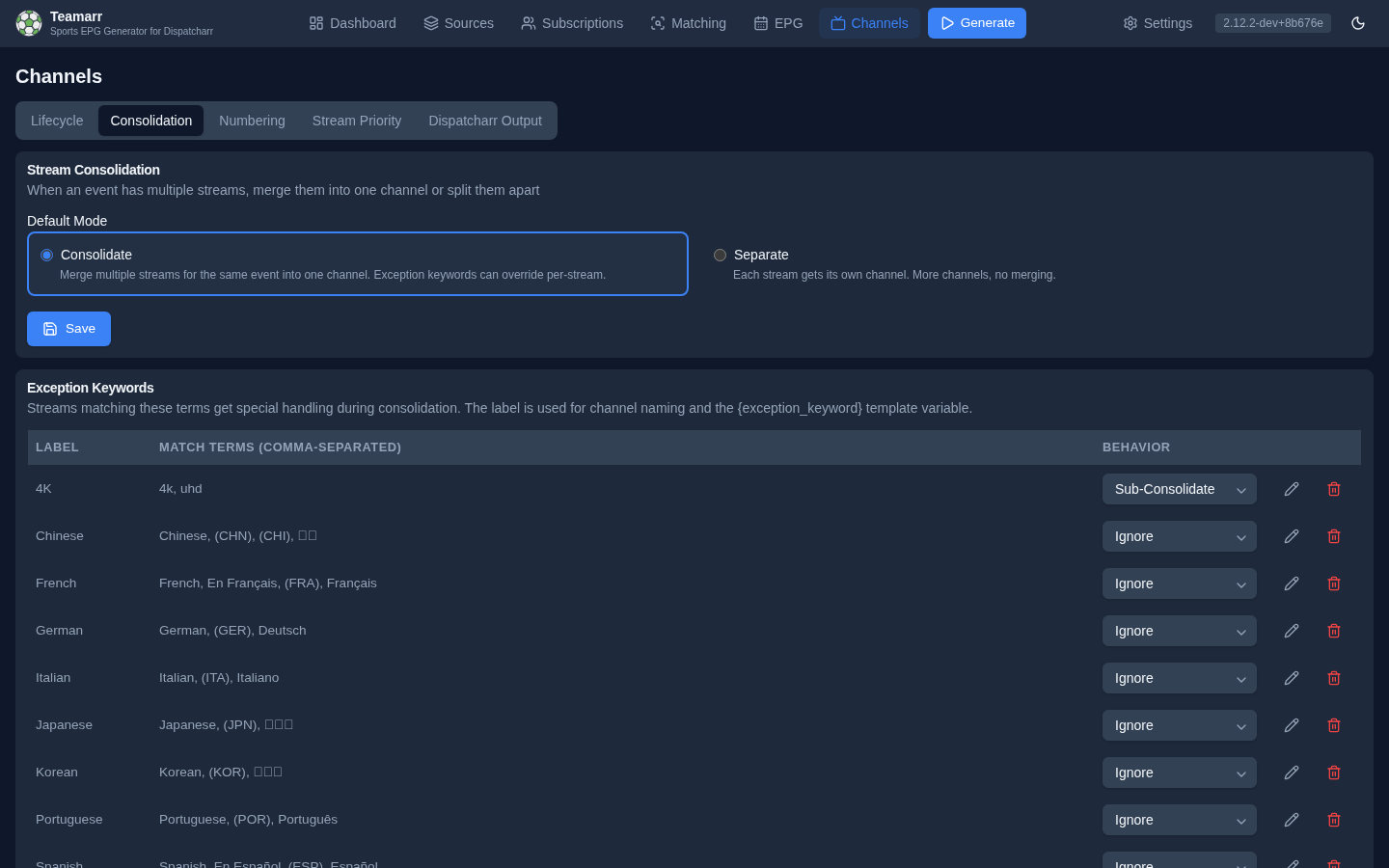
Each keyword has:
- Label — the display name. It’s appended to the variant channel’s name, resolves the
{exception_keyword}template variable (and the{exception_keyword}wildcard in channel group patterns), and is part of the channel’s tvg-id. - Match Terms — comma-separated terms matched against stream names. For a stream matched through its EPG guide (e.g. a linear
ESPN 2feed), the matched programme’s title and subtitle are checked too, so a ManningCast keyword with the termPeyton and ElicatchesMonday Night Football with Peyton and Elieven though the stream is only namedESPN 2. The stream name is checked first. Leave the terms empty when the keyword matches by source instead. - Match sources — optional; see below.
- Behavior — one of three:
| Behavior | Description |
|---|---|
| Sub-Consolidate | Group matching streams together on their own channel, separate from the main channel |
| Separate | Each matching stream gets its own channel |
| Ignore | Matching streams are dropped entirely — no channel |
- Enabled — an API-only flag (there’s no UI toggle); keywords disabled via the API disappear from the card.
Match sources
Many providers never put the language in the stream name: Cruz Azul vs. Toluca is Spanish only because it sits in the provider’s ES| VIX PPV group. The Match sources button (sliders icon) on a keyword row lets it match on where a stream comes from:
| Source | Matches |
|---|---|
| M3U group regex | The stream’s M3U group name, case-insensitive (^ES for every group whose name starts with ES). A live preview lists the groups it matches. |
| M3U groups | Groups picked from the list. Useful when a regex would also catch groups you don’t want. |
| Stream name regex | The stream name, for patterns the comma-separated terms can’t express (\(MX\) for a literal (MX)). |
| Event groups | Every stream matched through the chosen Teamarr event groups. |
| Pinned streams | Individual streams, picked from an event group’s raw streams. |
A stream carries one keyword, so when several could apply, the most specific evidence wins. Sources are checked in this order and the first match is used:
- pinned streams
- the stream name — match terms, then the stream name regex
- the matched EPG programme’s title (match terms)
- picked M3U groups
- the M3U group regex
- event groups
So a stream named Match 4K in an ES| group lands on a 4K keyword that matches the name, not on the ES keyword that matches the group. The event-name rule in the note below applies to match terms only; a regex you write is taken as intended.
When several keywords match
Two rules sit on top of that order:
- Ignore always wins. If any Ignore keyword matches a stream, by its name, its guide programme or any of its sources, the stream is dropped, whatever else it matches. A Spanish 4K stream is ignored when Spanish is set to Ignore; it does not slip through to the 4K channel. The one exception is a pinned stream, which always goes to the keyword it is pinned to.
- Otherwise the higher keyword wins. When two keywords match by the same kind of evidence, such as
ManningCastand4Kboth appearing in the stream name, the one higher in the Exception Keywords list is used. Use the up and down arrows in the Order column to change it. Until you reorder anything, the list is alphabetical.
With ManningCast above 4K, a ManningCast 4K stream joins the ManningCast channel; swap them and it joins the 4K channel instead.
Example — language by provider group. Keyword ES (Sub-Consolidate), no match terms, M3U group regex ^(ES|LA|VE|BO)\|. One event group per sport can now pull English and Spanish provider groups together: every stream from those groups lands on the ES channel, the rest on the main channel. With the {exception_keyword} group wildcard and an untagged label of EN, they are sorted into EN: Soccer and ES: Soccer.
Example — quality. Keyword 4K with the terms 4K, UHD and the M3U group regex ^4K\| catches both Arsenal v Chelsea UHD and every stream in the provider’s 4K| group, whatever it is named.
Naming untagged channels
A channel no keyword matched has no label, so {exception_keyword}: {matchup} would render as “: Team A v Team B” for it. Set Untagged label (Channels → Dispatcharr Output) to give those channels a value — with EN, you get EN: Team A v Team B beside ES: Team A v Team B. The label applies to the channel name, logo URL and EPG display name, and to {exception_keyword} in group and profile patterns. It never changes a channel’s tvg-id or which streams share a channel, and it does not trigger the automatic “(Label)” suffix, which only real keywords get.
A fresh install ships with eight language keywords seeded (Spanish, French, German, Portuguese, Italian, Japanese, Korean, Chinese — all Sub-Consolidate), so alternate-language feeds split out of the box. Each seeded keyword is offered once: delete or rename one and it stays gone across restarts and upgrades. To get a deleted default back, add it again by hand.
A keyword never fires on a word the event itself is named with: the Spanish keyword leaves a Spanish Grand Prix stream alone (and French a French Open stream), while En Español or (ESP) on that same event still counts as a language feed.
The Exception Keywords card is only shown in Consolidate mode, but stored keywords are checked on every run regardless of mode — a keyword’s behavior overrides the global mode per-stream (an Ignore keyword drops its streams even in Separate mode).
Keyword placement is enforced every generation: if a stream should move between a main channel and its keyword variant (because keywords, stream names, or a matched programme’s title changed), it’s moved, and the main channel is always kept on the lower channel number than its variants.
Race Feeds
Race weekends come with many simultaneous views of the same session — a camera on every driver, the pit lane, the driver tracker, live timing, team radio. Teamarr keeps a Race Feeds list for each racing league it has a roster for (Formula 1 today), one row per driver and one per feed type, and every row works like an exception keyword scoped to that league:
| Behavior | What happens to a matching stream |
|---|---|
| Own channel | The feed gets its own channel for each session (Spanish GP - Qualifying - Charles Leclerc), with the session’s guide data. A 4K copy of the same feed joins that channel. |
| Separate | Every matching stream gets its own channel. |
| Ignore | The stream is dropped. |
Everything starts as Ignore, so out of the box no onboard or pit-lane stream reaches any channel — the main broadcast is the only channel per session. Switch on the drivers you follow and each gets a channel per session; leave the rest ignored. “All own channel” and “All ignore” set every driver at once.
The driver names, the forms providers write them in (Charles Leclerc, Leclerc, C. Leclerc, LEC) and the feed vocabulary come from the provider roster and refresh with the team cache, so a mid-season substitute appears after their first race. Only the behavior and on/off switch are yours; a refresh never changes them. A driver who leaves the grid keeps their row so your choice survives if they return.
The checkbox in the On column is separate from the behavior. It controls whether Teamarr recognizes the feed at all. With it off, the row is left out of the keyword list, so that feed’s streams are no longer matched to this row: they may fall to another feed row that also matches (such as the generic Onboard row), join the session’s main channel, match a global exception keyword, or, when the name carries no Grand Prix and no other enabled feed names it, not match the race at all. Ignore keeps recognizing the feed and drops its streams, so use Ignore to get a driver’s onboard out of your lineup.
Because the rows are scoped to their league, a driver’s surname never affects other sports — Hamilton fires on F1 streams and not on the Tiger-Cats.
Feed Separation
When multiple IPTV providers carry separate home and away broadcast feeds for the same event, Feed Separation detects them and creates distinct channels for each.
How It Works
- Literal token detection — streams containing terms like “HOME” or “AWAY” are detected before team matching. The token is stripped so it doesn’t interfere with team-name parsing.
- Team streams — a stream matched as a team’s own channel (the whole stream name is one team, e.g.
MLB | Miami Marlins) is that team’s feed: with Detect Team Names on, it goes to that team’s feed channel instead of the shared one. - Broadcast-market detection — the stream is matched against the event’s actual broadcast listings from the provider (ESPN reports each network’s market: national, home, or away). This is how team-branded channels (“Brewers.TV”) and regional networks that don’t carry the team’s name at all (“YES”, “Marquee Sports Network”) resolve to the right feed. Matching tolerates the usual drift — punctuation, casing, run-together and abbreviated forms. National networks never count as a team feed, a stream matching both sides stays a normal channel, and very short names are skipped.
- Team-name detection — if enabled, streams are scanned for team names in a feed context (e.g., “Orioles Feed”, “(Orioles In-Arena)”, “Orioles.TV”, “Orioles.US”) and matched against the event’s home and away teams. A matchup title alone (“Pirates vs Marlins”) is a shared feed and never splits, and a marker that names no team (“(ESPN In-Arena)”) stays shared too.
- Channel discrimination — streams resolved to different teams get separate channels, even for the same event. Unlabeled streams go to their own channel as usual. Each feed channel gets its own tvg-id (
…-feed-<team>), which is why each carries distinct EPG.
Detection checks the stream name, tvg-id, and tvg-name — a stream whose tvg-id is Brewers.TV resolves even when its display name says nothing.
Settings
Feed identification always runs — every stream’s resolved feed team and which side it is (home, away, or unknown) are stored, driving the Specific Team’s Feed and Feed Side stream-priority rules even with the feature off. The master Feed Separation toggle gates only the channel splitting: whether resolved feeds get their own channels.
| Setting | Default | Description |
|---|---|---|
| Feed Separation | Off | Master toggle for the feature |
| Apply To Sports | (empty — all sports) | Restrict splitting to the selected sports — see below |
| Home Feed Terms | HOME | Comma-separated terms that indicate a home feed |
| Away Feed Terms | AWAY | Comma-separated terms that indicate an away feed |
| Detect Team Names | On | Also match team names in stream names (e.g., “Orioles Feed”) |
| Feed Label Style | Team Name | How feed channels are labeled — see below |
| Streams With No Home/Away Label | Give them their own channel | What happens to a stream Teamarr cannot place on either side, for a game that has a home or away feed — see below |
Streams With No Home/Away Label
Many streams carry no feed signal at all — a national broadcast, or a provider that lists one version of the game without saying which. With Feed Separation on, a game that has labelled feeds and unlabelled streams becomes three channels: the home feed, the away feed, and a third holding everything else.
- Give them their own channel (default) keeps that third channel.
- Ignore them skips the unlabelled streams for that game, so it shows only its feed channels. Skipped streams appear in Run History as excluded with the reason
unlabeled_feed.
The setting only acts on a game that has at least one separated feed, from any source. A game where no stream is labelled keeps its single ordinary channel, so ignoring can never leave a game without one. Teamarr never assigns an unlabelled stream to a side.
Two things to expect with Ignore them: a national broadcast is neither home nor away, so it is skipped for games that have feeds; and when the labelled and unlabelled streams come from different sources, the third channel can exist for one run before the feeds are known and it is removed.
Scoping It To Certain Sports
Home and away feeds are a regional-sports-network phenomenon. They’re real and common in baseball, basketball, hockey and football, and they don’t exist at all in racing, combat sports, tennis and golf — those have no home or away side to broadcast from.
Apply To Sports restricts the split to the sports you pick. Leave it empty and separation applies everywhere, which is how it has always behaved and what existing setups keep on upgrade. Pick Baseball, say, and MLB events split into home and away feed channels while every other sport keeps a single shared channel per event.
The list only ever narrows the master toggle — it can’t switch separation on for a sport while the toggle is off. And it changes only the channel splitting: feed identification still runs for every sport, so the Specific Team’s Feed and Feed Side stream-priority rules keep working in sports you left unselected.
The sports offered are the ones your subscribed leagues cover.
Turning It Off
Turning the master toggle off un-splits on the next generation run: the existing …-feed-<team> channels are deleted and their streams re-land on the event’s shared channel in that same pass, freeing the channel numbers the feed block held. Only events matched by that run are reclaimed — a feed channel for an event that isn’t in today’s slate keeps its normal end-of-event deletion rather than being pulled mid-broadcast.
Removing a sport from Apply To Sports un-splits that sport the same way, on the same schedule — the reclaim isn’t limited to the master toggle.
Label Styles
Controls the label appended to channel names when a feed team is detected (always in the form (<label> Feed)):
| Style | Example |
|---|---|
| Team Name | NYY @ BAL (Orioles Feed) |
| Short Name | NYY @ BAL (BAL Feed) |
| Home/Away | NYY @ BAL (Home Feed) / (Away Feed) |
If your channel-name template already places the feed team itself (any feed variable — {feed_team*}, {broadcast_feed*}, or {feed_home_away}), the automatic (… Feed) suffix is suppressed — the template wins.
Example
Given an event “NYY @ BAL” with streams (default Team Name style):
MLB: NYY @ BAL HOME→ detected as home feed → channel:NYY @ BAL (Orioles Feed)MLB: NYY @ BAL AWAY→ detected as away feed → channel:NYY @ BAL (Yankees Feed)MLB: NYY @ BAL→ no feed detected → channel:NYY @ BAL
This creates three separate channels, each consolidating their respective streams.