Template Conditions
Conditions let you show different programme content based on game context. Instead of a single static description, you can have multiple options that trigger based on specific situations — and each option can also override the programme title, subtitle, artwork URL, and channel logo URL.
How Conditions Work
Each condition option has:
- Condition: What to check (e.g.,
is_home,win_streak) - Value: For numeric conditions, the threshold (e.g.,
5for a 5-game streak) - Priority: Lower numbers = higher priority (1-99 for conditionals, 100 for defaults)
- Template: The description to use if the condition matches
- Title / Subtitle Override (optional): replace the programme title and/or subtitle when this condition matches — e.g. put a bowl name or
{game_event_note}in the title for marquee games - Artwork URL Override (optional): replace the programme artwork/poster URL (e.g. to use a custom playoff cover or matchup thumbnail with
{series_game}badge) - Channel Logo URL Override (optional): replace the channel logo URL for events matching this condition
- Label (optional): a display name for the row, shown in the editor
When generating EPG, Teamarr evaluates all conditions and selects the highest-priority (lowest number) match. If multiple conditions match at the same priority, one is chosen randomly.
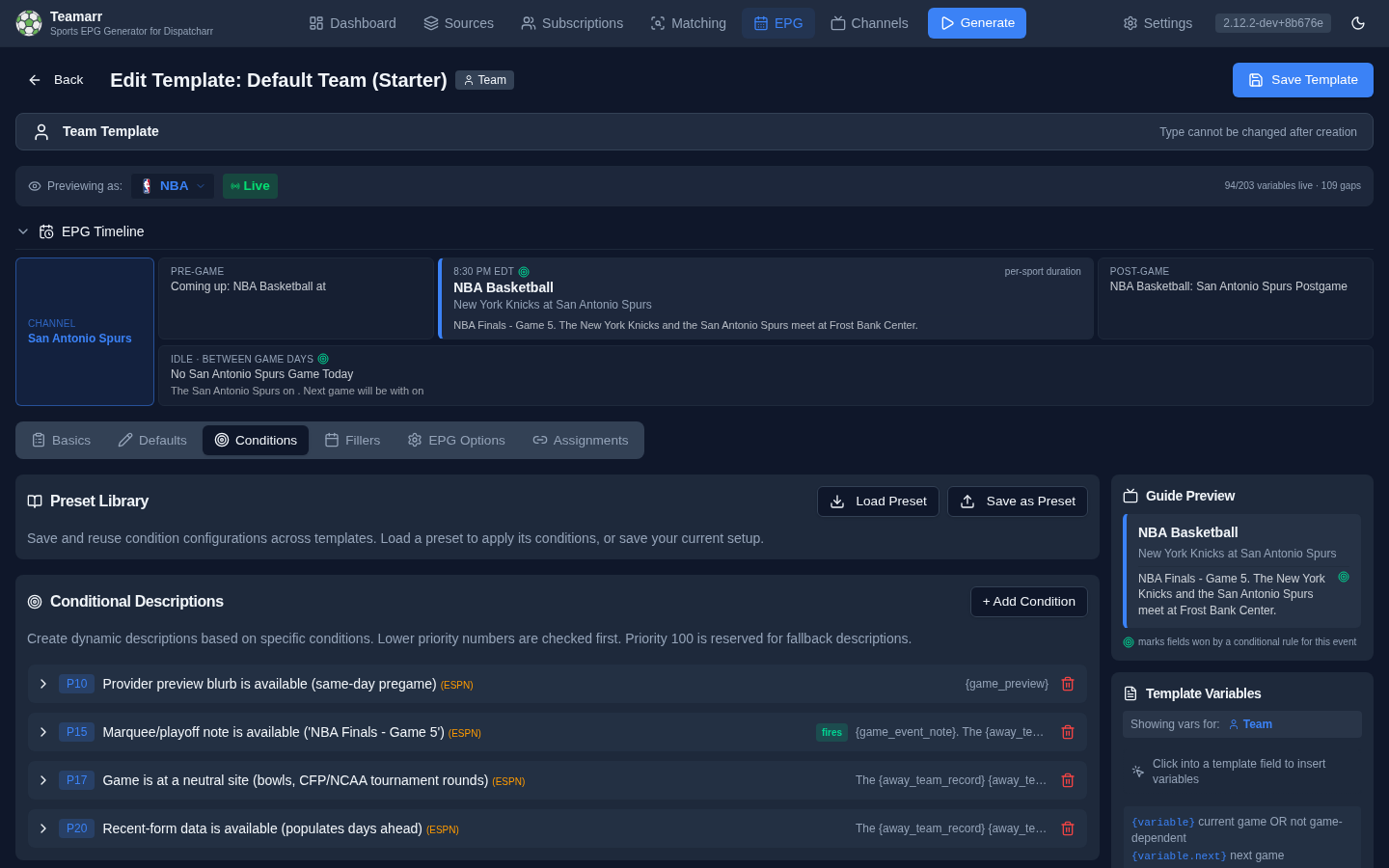
In the template editor, each row carries a live trace badge driven by the selected preview event — green when the row fires (it’s the winner), amber when it matched but lost to a higher-priority row, muted when it doesn’t match — with a reason line explaining why. Condition names are advisory-validated as you type, like variables.
The picker offers a different set per template type. Event templates get everything except the “our team” perspective conditions (
is_home,is_away,win_streak,loss_streak,is_ranked,is_ranked_opponent,opponent_name_contains) — those need a subscribed team, and event channels are positional. Team templates get the full list.
Condition presets
A set of condition rows can be saved as a reusable preset from the Conditions tab — save the current rows under a name, then apply (or delete) presets from the same menu on any other template. Applying a preset replaces the tab’s rows with the preset’s.
Title, subtitle, artwork, and logo selection
Overrides are selected per field, independently: for each field (title, subtitle, artwork URL, channel logo URL, and description), the highest-priority matching row that defines that field wins. A row that only sets an artwork override leaves the description, title, and subtitle to lower-priority rows (and vice versa), and any field with no matching override falls back to the template’s default value. Unlike descriptions, ties at the same priority resolve deterministically (first row wins) for titles, subtitles, artwork, and channel logos, so guide assets and titles don’t change between EPG runs.
Example — a playoff row that updates the guide title, description, and adds a Game Thumbs badge to both programme art and the event channel tile:
{"condition": "is_playoff", "priority": 15,
 "title": "{game_event_note}: {away_team} at {home_team}",
 "subtitle": "{series_summary}",
 "program_art_url": "{league_code}/{away_team|pascal}/{home_team|pascal}/thumb.png?aspect=16-9&badge={series_game|url}",
 "event_channel_logo_url": "{league_code}/{away_team|pascal}/{home_team|pascal}/thumb.png?aspect=16-9&badge={series_game|url}",
 "template": "{series_summary}. {away_team} take on {home_team} in {series_game}."}
GAME 2 is a custom badge in Game Thumbs: self-host with ALLOW_CUSTOM_BADGES=true or the image appears without the overlay. See the setup and image-sink guidance. The event_channel_logo_url override applies to event templates, not persistent team-channel logos.
Priority System
| Priority | Purpose |
|---|---|
| 1-49 | High priority conditionals (rare situations) |
| 50-99 | Normal priority conditionals |
| 100 | Default fallback (always matches) |
Lower numbers win. A priority 10 condition beats priority 50, which beats priority 100.
Filler Condition Rows
The same row mechanism drives the filler registers (pregame, postgame, and idle) on the Fillers tab. Filler rows use the identical shape and per-field selection rules as the main condition rows, with two filler-specific twists:
Reference game. Fillers have no “current game”, so each register’s rows evaluate against its natural reference: pregame → the next game, postgame and idle → the last game. Postgame and idle refresh the game’s status from the provider before evaluating, so is_final reflects reality even when the cached schedule is stale. On event channels, both registers evaluate against the channel’s event. Remember the variable suffix that goes with the reference: a team-template postgame row reads the last game via .last ({game_recap.last}), while event-template rows use the bare form ({game_recap}).
Description cascade. A winning row’s description that resolves to an empty string — the classic case is {game_recap} for a game that just ended, before the provider publishes a recap — falls through to the next matching row by priority, and finally to the register’s base description. Fields no matching row sets always fall back to the register’s base content.
The recap-first pattern (what new templates and the starter set ship):
[{"condition": "has_recap", "priority": 10, "template": "{game_recap.last}"},
 {"condition": "is_not_final", "priority": 50,
  "template": "The game between {team_name_the} and {opponent_the.last} has not yet ended."}]
Recap published → it renders verbatim. Game still running → the in-progress line. Final but no recap → neither row fires and the base register’s constructed result line renders.
The idle register’s no-schedule override (no upcoming game in the lookahead) stays separate from condition rows. It applies both in the off-season and when a provider has not published a schedule. Each enabled title, subtitle, or description field replaces only its corresponding normal idle field. Condition rows need a reference game to evaluate.
Available Conditions
Home/Away
| Condition | Value | Description |
|---|---|---|
is_home | - | Team is playing at home |
is_away | - | Team is playing away/on the road |
Example:
{"condition": "is_home", "priority": 50, "template": "{team_name} hosts {opponent} at {venue}"}
{"condition": "is_away", "priority": 50, "template": "{team_name} travels to face {opponent}"}
Streaks
| Condition | Value | Description |
|---|---|---|
win_streak | Minimum streak length | Team is on a winning streak >= value |
loss_streak | Minimum streak length | Team is on a losing streak >= value |
Example:
{"condition": "win_streak", "condition_value": "5", "priority": 10, "template": "🔥 {team_name} riding a {win_streak}-game win streak!"}
{"condition": "loss_streak", "condition_value": "3", "priority": 20, "template": "{team_name} looking to snap a {loss_streak}-game skid"}
Rankings (College)
| Condition | Value | Description |
|---|---|---|
is_ranked | - | Team is ranked (top 25) |
is_ranked_opponent | - | Opponent is ranked (top 25) |
is_ranked_matchup | - | Both teams are ranked (top 25) |
is_top_ten_matchup | - | Both teams are in the top 10 |
Example:
{"condition": "is_top_ten_matchup", "priority": 5, "template": "🏆 Top 10 showdown! {team_rank_display} {team_name} vs {opponent_rank_display} {opponent}"}
{"condition": "is_ranked_matchup", "priority": 15, "template": "Ranked matchup: {team_rank_display} {team_name} vs {opponent_rank_display} {opponent}"}
{"condition": "is_ranked_opponent", "priority": 30, "template": "{team_name} faces {opponent_rank_display} {opponent}"}
Season Type
| Condition | Value | Description |
|---|---|---|
is_playoff | - | Playoff/postseason game (the NBA play-in counts) |
is_preseason | - | Preseason/exhibition game |
Example:
{"condition": "is_playoff", "priority": 5, "template": "🏆 PLAYOFF: {team_name} vs {opponent}"}
{"condition": "is_preseason", "priority": 50, "template": "Preseason: {team_name} vs {opponent}"}
Neutral Site
| Condition | Value | Description |
|---|---|---|
is_neutral_site | - | Game is at a neutral site (bowls, CFP/NCAA tournament rounds, showcase games) |
Host framing (“X travel to…”, “Y host X…”) misrepresents a game nobody hosts — branch to neutral prose instead. The {at_vs} / {vs_at} / {vs_@} connector variables also read vs automatically at neutral sites, so subtitles flip without a condition.
Example:
{"condition": "is_neutral_site", "priority": 17, "template": "{away_team} and {home_team} meet at {venue}."}
Conference (College)
| Condition | Value | Description |
|---|---|---|
is_conference_game | - | Both teams are in the same conference |
Example:
{"condition": "is_conference_game", "priority": 40, "template": "{college_conference} matchup: {team_name} vs {opponent}"}
Broadcast
| Condition | Value | Description |
|---|---|---|
is_national_broadcast | - | Game is on national TV (ABC, CBS, NBC, FOX, ESPN, ESPN2, TNT, TBS) |
Example:
{"condition": "is_national_broadcast", "priority": 60, "template": "{team_name} vs {opponent} on {broadcast_network}"}
Odds
| Condition | Value | Description |
|---|---|---|
has_odds | - | Betting odds are available for this game |
Example:
{"condition": "has_odds", "priority": 70, "template": "{team_name} ({odds_spread}) vs {opponent}. O/U: {odds_over_under}"}
Game State
| Condition | Value | Description |
|---|---|---|
is_final | - | The reference game is final |
is_not_final | - | The reference game exists but is not final yet |
Both return false when there is no reference game at all. They’re a deliberate pair rather than one condition and its negation: rows for “game over” and “game still going” stay independent, so a field one row doesn’t set falls through to your defaults instead of leaking from the other state.
These shine in filler condition rows, where the reference game is the register’s next/last game with freshly-checked status.
Provider Copy (ESPN)
| Condition | Value | Description |
|---|---|---|
has_preview | - | Provider preview blurb is available (populates same-day pregame) |
has_generated_preview | - | Optional generated preview is available from typed provider facts |
has_recap | - | Provider recap headline is available (populates once the game is final) |
has_structured_preview | - | Recent-form data is available (populates days ahead) |
has_event_note | - | Marquee/playoff note is available (NBA Finals - Game 5, CFP Quarterfinal at the Cotton Bowl Classic); empty for ordinary games |
has_match_note | - | Soccer competition note is available (FIFA World Cup, Group C); soccer only |
has_knockout_round | - | Soccer cup knockout stage is known (Round of 16, Final); league-phase and group games do not match |
match_leg | 1 or 2 | Match is that leg of a two-legged cup tie; one-off finals never match |
Use these to prefer ESPN’s editorial copy and fall back to constructed prose when it isn’t published yet — the pattern the starter templates ship with:
Example:
[
  {"condition": "has_preview", "priority": 10, "template": "{game_preview}"},
  {"condition": "has_event_note", "priority": 15, "template": "{game_event_note}. {team_name} vs {opponent} at {venue}"},
  {"priority": 100, "template": "{team_name} vs {opponent} at {venue}"}
]
Opponent
| Condition | Value | Description |
|---|---|---|
opponent_name_contains | Search string | Opponent name contains the specified text (case-insensitive) |
Example:
{"condition": "opponent_name_contains", "condition_value": "Rival", "priority": 20, "template": "🔥 Rivalry game! {team_name} vs {opponent}"}
League / Sport
| Condition | Value | Description |
|---|---|---|
league_is | League code(s), comma-separated | Event’s league matches one of the given codes (case-insensitive), e.g. cfb or cfb,nfl |
sport_is | Sport code(s), comma-separated | Event’s sport matches one of the given codes (case-insensitive), e.g. football,basketball |
Available to both team and event templates — one template can branch its description by league or sport instead of needing a separate template variant per league.
Example:
{"condition": "league_is", "condition_value": "cfb", "priority": 15, "template": "College football: {away_team} at {home_team}"}
Combat Sports (UFC/Boxing)
Result-based conditions for the headline bout — all false until the fight is final. Pair them with the Fight Results variables in postgame filler.
| Condition | Value | Description |
|---|---|---|
is_knockout | - | Fight ended by KO or TKO |
is_submission | - | Fight ended by submission |
is_decision | - | Fight went to a decision (any kind) |
is_finish | - | Fight ended in a finish (KO/TKO/submission — not a decision) |
went_distance | - | Fight went all scheduled rounds |
Example:
{"condition": "is_finish", "priority": 10, "template": "{fighter1} def. {fighter2} — {fight_summary}"}
{"condition": "is_decision", "priority": 20, "template": "{fighter1} def. {fighter2} by {fight_result} ({judge_scores})"}
Motorsports
Session-aware conditions for racing templates, where each channel covers one session of a race weekend.
| Condition | Value | Description |
|---|---|---|
is_race_session | - | This channel’s session is the race itself |
is_qualifying_session | - | This channel’s session is qualifying (or sprint qualifying) |
has_results | - | This channel’s session has finished with results |
Example:
{"condition": "has_results", "priority": 10, "template": "{session_name} results: {race_winner} wins the {race_name}"}
{"condition": "is_race_session", "priority": 50, "template": "The {race_name} from {circuit_name}"}
Default Descriptions
Priority 100 is reserved for default descriptions that always match. You should always have at least one default as a fallback.
{"priority": 100, "template": "{team_name} vs {opponent}"}
If you have multiple defaults (all at priority 100), one is chosen randomly - useful for variety.
Complete Example
Here’s a complete set of conditions for a college football team template:
[
  {"condition": "is_playoff", "priority": 5, "template": "🏆 PLAYOFF: {team_name} vs {opponent}"},
  {"condition": "is_top_ten_matchup", "priority": 10, "template": "🔥 Top 10 clash! {team_rank_display} {team_name} vs {opponent_rank_display} {opponent}"},
  {"condition": "win_streak", "condition_value": "5", "priority": 15, "template": "{team_name} riding a {win_streak}-game win streak vs {opponent}"},
  {"condition": "is_ranked_matchup", "priority": 20, "template": "Ranked matchup: {team_rank_display} {team_name} vs {opponent_rank_display} {opponent}"},
  {"condition": "is_ranked_opponent", "priority": 30, "template": "{team_name} faces {opponent_rank_display} {opponent}"},
  {"condition": "is_conference_game", "priority": 40, "template": "{college_conference} game: {team_name} vs {opponent}"},
  {"condition": "is_home", "priority": 50, "template": "{team_name} hosts {opponent} at {venue}"},
  {"condition": "is_away", "priority": 50, "template": "{team_name} travels to face {opponent}"},
  {"priority": 100, "template": "{team_name} vs {opponent}"}
]
Evaluation walks the priorities from lowest number to highest; the priority-100 default is the guaranteed fallback. Description ties at the same priority are chosen randomly (titles and subtitles pick the first row deterministically).