Dispatcharr Output
How Teamarr writes its channels into Dispatcharr — which profiles they appear in, which stream profile processes them, and which channel group they land in. Set global defaults here, then override them per league where needed.
Dispatcharr connection (URL, credentials), the EPG source, and logo cleanup live in Settings → Dispatcharr — those are connection and housekeeping concerns, not channel routing.
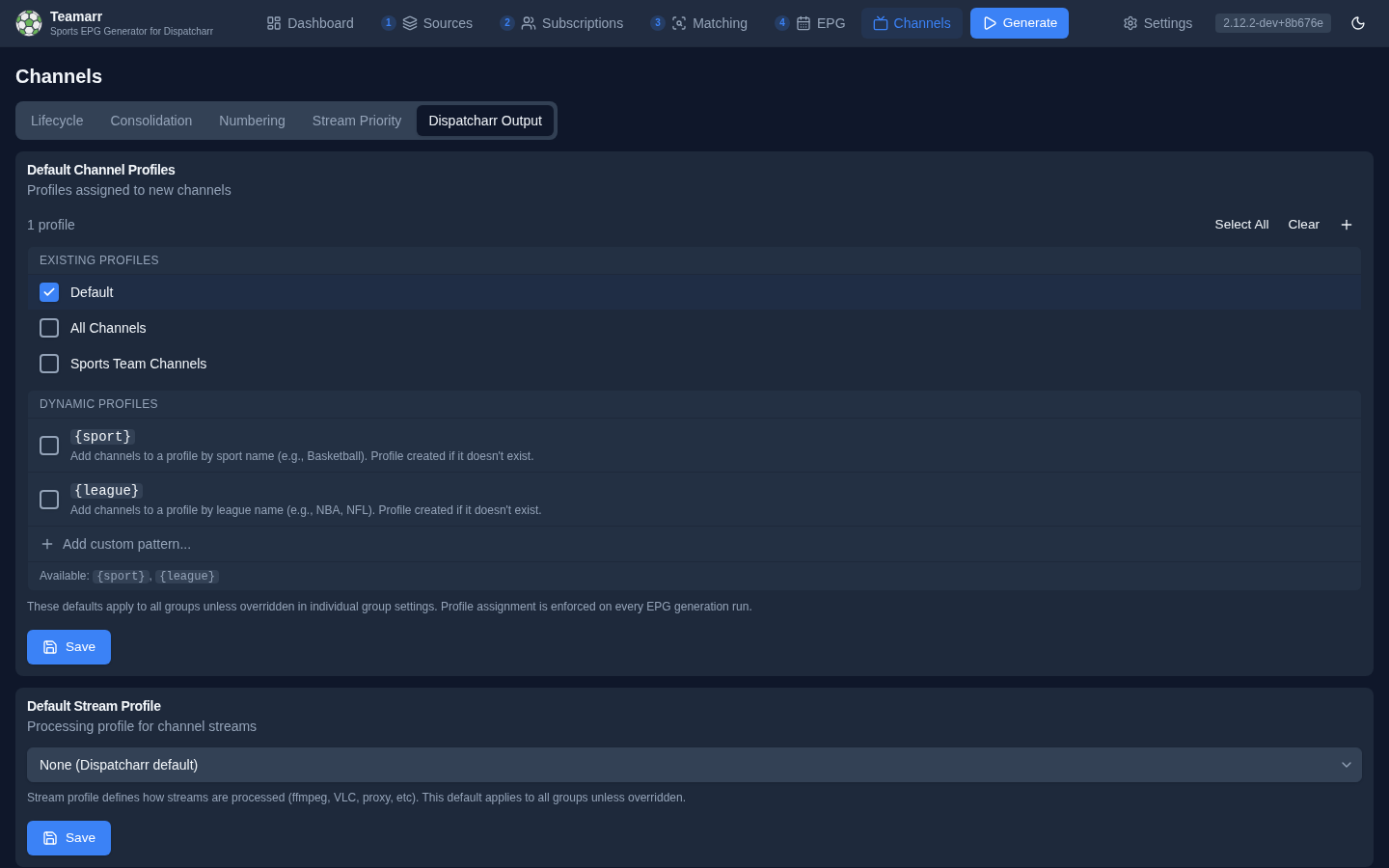
Default Channel Profiles
Which Dispatcharr profiles new Teamarr channels are assigned to. These defaults apply to all sources unless overridden per league. Profile assignment is re-enforced on every EPG generation run.
The selector lists your existing profiles as checkboxes, plus two dynamic profile entries — {sport} and {league} — and an Add custom pattern… input for combined patterns (a custom pattern must contain {sport} or {league}). Dynamic profiles are created in Dispatcharr on demand: check {sport} and every channel is also added to a profile named for its sport.
Default Stream Profile
The Dispatcharr stream profile applied to channel streams. The stream profile defines how streams are processed (ffmpeg, VLC, proxy, etc.). This default applies everywhere — there is no per-league stream-profile override.
Default Channel Group
The Dispatcharr channel group new channels are assigned to, plus how that group is chosen.
Channel Group
Pick a static group from the dropdown. By default the list hides M3U-sourced groups; toggle Show M3U-sourced channel groups to assign a group that originated from an M3U account.
Group Mode
| Mode | Description |
|---|---|
| Static | All channels go to the selected group above |
| Dynamic by Sport | Auto-creates and assigns groups named by sport |
| Dynamic by League | Auto-creates and assigns groups named by league |
| Custom pattern | Define a pattern using {sport}, {league}, {conference}, {conference_abbrev}, {division}, and {exception_keyword} placeholders. A value with no placeholder is taken as a group name as it stands |
When Custom pattern is selected, a pattern field appears. For example, {sport} | {league} creates groups like “Hockey | NHL”. Teamarr creates these dynamic groups in Dispatcharr automatically. |
In group patterns, {sport} resolves to the sport’s display name (“Hockey”), and {league} to the league’s short alias — “EPL”, not “English Premier League”. {conference} resolves to the home team’s conference name for NCAA football/basketball events (“Southeastern Conference”), {conference_abbrev} to its compact form (“SEC”, “ACC”, “Big Ten”), and {division} to that conference’s division — FBS or FCS for college football, Division I for college basketball. Events without conference data fall back to the static group.
Every wildcard takes the same |filter chain as template variables: {sport|upper} | {league} names groups “HOCKEY | NHL” and “BASEBALL | MLB” instead of mixing “Hockey” with “NHL”; {league|lower}, {sport|title} and |slug work the same way, and filters chain left to right. A misspelled filter leaves the wildcard unresolved, so the channel lands in the static group rather than in a group named after the typo. |
{exception_keyword} resolves to the label of the exception keyword the channel’s stream matched — by name, or by source such as its M3U group — so {exception_keyword}: {sport} puts Spanish-keyword channels in “Spanish: Rugby”. It also works in channel profile patterns. A channel no keyword matched has no label: it falls back to the static group unless you set an Untagged label (below the group mode), which stands in for the keyword — with EN set, those channels land in “EN: Rugby”. The same setting fills {exception_keyword} in channel name and logo templates.
{division} is the light-touch way to tame a college football Saturday: {league} | {division} splits ~80 games into “NCAAF | FBS” and “NCAAF | FCS” without the 25 groups {conference} produces. When you do want per-conference groups but not the long names, {conference_abbrev} gives you “NCAAF | SEC” instead of “NCAAF | Southeastern Conference”. All three wildcards bucket on the home team, so an FBS-vs-FCS game lands in FBS — which is where you want it, since the FCS side is the visitor in those matchups. {division} needs a conference-tree refresh (Settings → Cache → Refresh) before it resolves; until then those events fall back to the static group. |
A few failure modes are handled gracefully: a pattern whose wildcard can’t resolve for an event falls back to the static group; and if a configured static group has been deleted in Dispatcharr, the channels are created ungrouped with a log warning telling you to re-select a group.
Managed Team EPG Channels
Persistent team channels have their own channel group and channel profiles, set on this page. They deliberately do not inherit the global event-channel defaults above. Grouping decides whether the per-league table applies to them: with Own group (the default) every team channel goes in the team channel group; with Group with league a team channel uses its league’s channel group from Per-League Channel Config below, and the team channel group when that league has none. Leave the profiles empty for every profile, or narrow them the same way (existing profiles, {sport}, {league}). The default stream profile applies to team channels too.
Per-League Channel Config
Override channel profiles, channel groups, group modes, the matchup order, and the create timing on a per-league basis. The Subscribed only toggle is on by default, so the table opens with just your subscribed leagues (turn it off to see all; the search field filters within whatever’s visible). Click a league row to expand its configuration.
Available Overrides
| Setting | Options | Description |
|---|---|---|
| Channel Profiles | Default or specific profiles | Which Dispatcharr profiles this league’s channels appear in |
| Channel Group | Default or specific group | Which Dispatcharr channel group to assign channels to |
| Channel Group Mode | Default, Static, Dynamic by Sport, Dynamic by League, Custom | How the channel group is determined |
| Divisions | All (default) or a subset | Which divisions of an NCAA league to ingest at all — college football and both college basketballs only |
| Playoff & All-Star Games | Default, Always include, Follow team filter | Whether this league’s postseason and All-Star games skip the team filter |
| Create Timing | Default, Same day, Before event + buffer (0–336 hours) | When this league’s event channels are created — see Per-league create timing |
When Channel Group Mode is set to Custom, a pattern field appears where you can enter a template like {sport} - {league} that dynamically creates groups.
Per-league overrides take precedence over the global defaults above. Use the X button to clear an override and revert to the default.
The NBA play-in counts as postseason here. Playoff & All-Star Games overrides the “Include all playoff & All-Star games” switch for one league. Always include lets that league’s postseason and All-Star games through the team filter even when the switch is off; Follow team filter keeps them subject to it even when the switch is on, so you can follow a few MiLB teams without getting every MiLB playoff game while MLB playoffs still come through. The league’s choice wins over a source’s own setting, which wins over the global one. It only matters while a team filter is active.
Divisions narrows what Teamarr fetches for the NCAA leagues ESPN splits across division scoreboards: college football (Division I (FBS & FCS) / Division II & III), men’s and women’s college basketball, and women’s college volleyball (NCAA Division I / Non-NCAA Division I). Every other NCAA league fetches a single Division I slate, so it has nothing to select. Deselecting a division means those games are never requested — no matching cost, no channels, and no lower-division events falling back into your default group because {division} can’t name them. ESPN files a game under a division when either side belongs to it, so cross-division fixtures (an FCS team hosting a Division II opponent) survive with Division I alone; only games played entirely inside a dropped division disappear. Leave every division checked — the default — and nothing changes.
If you use {division} in a group pattern and see lower-division games landing in your default channel group, this is the setting: the conference tree only names FBS and FCS, so a Division II or III home team has no division to resolve. Deselect Division II & III and those games stop being ingested altogether.
Matchup Order decides which team {matchup} and {team1}/{team2} name first for that league: Default inherits the global setting under Settings → General → Localization; Auto follows the sport’s convention; Away first / Home first force it. Useful when one competition breaks its sport’s habit (a soccer league you want listed visitor-first, or vice versa).