General Settings
System-level configuration: time, scheduled generation, the TheSportsDB API key, and update notifications.
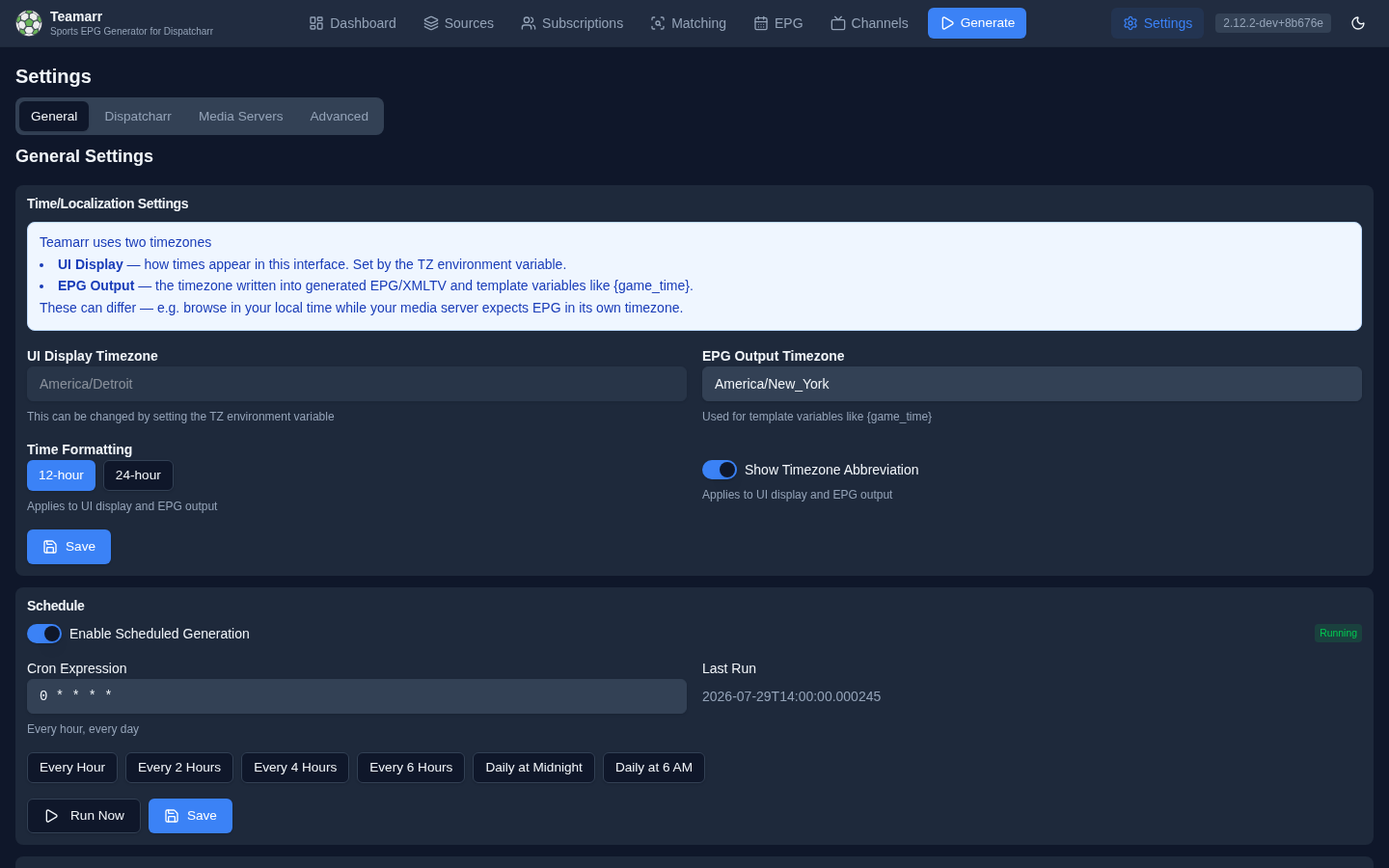
Localization
Teamarr uses two timezones — they can differ on purpose (browse in your local time while your media server expects EPG in its own timezone):
| Timezone | What it controls | Where it’s set |
|---|---|---|
| UI Display | How times appear in this web interface | The TZ environment variable (read-only in the UI). When TZ is unset or invalid, the UI falls back to the EPG Output timezone |
| EPG Output | The timezone written into generated EPG/XMLTV and template variables like {game_time} | Editable here |
# docker-compose.yml example
environment:
  - TZ=America/New_York
Time Formatting
- Time format — 12-hour (
3:45 PM) or 24-hour (15:45). Applies to both the UI and EPG output. - Show timezone abbreviation — toggle whether abbreviations (EST, PST, …) appear alongside times.
Sport Naming
Choose the vocabulary Teamarr uses for the two sports whose names differ by region:
| Setting | Association football | Gridiron |
|---|---|---|
| US (default) | Soccer | Football |
| International | Football | American Football |
The choice applies everywhere a sport is named from data: the {sport} template variable, the {sport} wildcard in Dispatcharr channel-group and profile patterns, and sport labels throughout this interface. It does not change stream matching (stream names are matched on both words already), the soccer mode subscription setting, or the names of the starter templates.
Switching the setting renames any Dispatcharr channel group built from {sport} on the next generation: with International, NFL channels move to a new “American Football” group and the existing “Football” group becomes association football.
Matchup Order
Which team is named first in a matchup:
| Setting | Behaviour |
|---|---|
| Auto (default) | The sport’s convention: visitor first for football, basketball, baseball and hockey (Bears @ Lions); home first for soccer, rugby, cricket and Australian football (Ipswich Town v Liverpool). Neutral-site games read v. |
| Away first | Always visitor first |
| Home first | Always home first |
The setting governs the order-aware variables only: {matchup}, {matchup_short}, {matchup_abbrev}, and {team1}/{team2} with their _short and _abbrev forms. The starter templates use these, so switching the setting changes their subtitles and channel names on the next generation. Text you have typed yourself as {away_team} vs {home_team} keeps that order; use {team1} {at_vs} {team2} instead if you want it to follow the setting.
Override the order for one league on the per-league table under Channels → Dispatcharr Output.
Schedule
Enable automatic EPG generation on a cron schedule. A status badge shows whether the scheduler is Running or Stopped, along with the last run time.
Cron Expression
Standard cron format. Presets are one click away:
| Preset | Expression |
|---|---|
| Every Hour | 0 * * * * |
| Every 2 Hours | 0 */2 * * * |
| Every 4 Hours | 0 */4 * * * |
| Every 6 Hours | 0 */6 * * * |
| Daily at Midnight | 0 0 * * * |
| Daily at 6 AM | 0 6 * * * |
Below the field, a plain-English description of the expression confirms what you typed (“Every hour, every day” — or “Invalid cron expression”).
Run Now
Manually trigger a full generation run without waiting for the schedule.
TheSportsDB API Key
Required for every TheSportsDB-sourced league. TheSportsDB’s free tier was deprecated in v2.15 — without a key, TSDB leagues produce no events and no team channels, the league picker crowns them, and a startup log lists any subscribed ones. The same key gates Custom Leagues. A premium key is ~$9/month (100 req/min, full event coverage + team schedules) — get one at thesportsdb.com/pricing.
A saved key displays masked (********); type over it to replace it. The Configured badge in the card header only means a key is stored — it isn’t validated. To actually verify a key, retype it and click Validate, which tests it against TSDB live (clicking Validate on the masked placeholder will report invalid).
See TSDB Provider for technical details.
Update Notifications
Teamarr can check for new versions and notify you when updates are available.
- Current Version — your running version (dev builds show commit hashes) with its release date and a “Last checked” timestamp. When an update is available, an Update Available badge appears with the newer version and a View Update button linking to the release.
- Enable automatic update checks — toggle update checking on/off. With checks disabled, the version card shows no update info.
- Notify about stable releases / Notify about dev builds — which release channels to notify about.
- Check Now — manually trigger an immediate check (bypasses the cache; automatic checks are cached for one hour).
For forks, the check target (GitHub owner/repo/branch) is configurable via the API (PUT /settings/update-check) — there’s no UI for it.